



FxPro Review 2026
Our verdict
Score colours: Top 10% Above average
FXEmpire avg 4.2 is a benchmark exclusive to FXEmpire: the average score of all 73 brokers we tested this year. It shows at a glance how the broker you're considering measures up against the industry.
Every broker is tested hands-on by our analysts, against the same 250+ variables.
- Top 10% the highest scores
- Above average the next 25%
- Best for: Day traders
- Algo traders
- News traders
- Good for: Scalpers
- Swing traders
- Beginners
- Commodity traders
- Not ideal for: Crypto traders
- Cost-conscious traders
FxPro is geared most towards veteran traders thanks to its advanced platforms and tools. But it can also work well for beginners. The more intuitive FxPro WebTrader platform, along with solid educational resources, enhances the experience for newcomers to the markets. I noted that FxPro offers a better-than-average selection of trading platforms (WebTrader, TradingView, MT4, MT5, and cTrader) – a breadth I’ve rarely seen matched at a single broker.
In my testing, FxPro’s trading costs were average to high on the Standard account, but I found more competitive conditions on the Raw+ account. When testing the Raw+ account, I recorded spreads of 0.2 pips in EUR/USD and 15 cents in gold. I confirmed that FxPro offers 2,100 CFDs. I was especially impressed by the range of forex and crypto pairs. The broker also stood out to me with valuable tools like Trading Central and FxPro Squawk.
FxPro is less ideal for traders seeking the tightest spreads. My tests showed that Standard account spreads were average to high. I also noted that FxPro may be less suitable for traders looking for strong account protection if their account is with the offshore entity.
Every broker reviewed on FXEmpire pays an annual listing fee. The fee buys the listing, not the score: our analysts test every broker hands-on and the rating is theirs alone. How we test and score →
How we tested trust:
- We verified every license of the broker directly on the regulators' registers, not on the broker's website.
- We checked how client funds are protected: segregation, negative balance protection, compensation schemes.
- We read the broker's legal documents ourselves: terms, conditions and fee schedules.
- We looked at business history, corporate structure and years in the industry.
How we tested fees:
- We measured live spreads and commissions on the most traded instruments, during the London and New York sessions.
- We recorded swap rates and non-trading fees from the broker's own documents.
- We compared every number with the FXEmpire benchmark: the average of all brokers we tested.
- The numbers in this review are our measurements, with their dates.
How we tested the platforms:
- We traded on the broker's web, desktop and mobile platforms ourselves.
- We placed orders of every type and timed the execution.
- We tested the charts, the indicators and the drawing tools in daily use.
- We scored usability, functionality and stability against the FXEmpire benchmark.
How we tested the instruments:
- We counted the instruments in each asset class inside the trading platform, not from the marketing pages.
- We checked which products are real assets and which are CFDs.
- We compared the range with every other broker in our database.
How we tested customer support:
- We contacted the broker ourselves on every channel it offers: live chat, phone, email and messaging apps.
- We measured how long it took to reach a live agent, and recorded the date of each test.
- We asked real trader questions and scored the answers for accuracy and professionalism.
How we tested research:
- We used the broker's research tools ourselves: in-house and third-party analysis, news, signals and calendars.
- We checked how often the content is updated and whether it is useful for trading decisions.
- We scored the quality and the range against the FXEmpire benchmark.
How we tested deposits and withdrawals:
- We checked every payment method, its fees, limits and processing time, from the broker's documents and the client area.
- We looked for hidden fees and currency conversion costs.
- We compared the conditions with every other broker in our database.
How we tested the accounts:
- We opened an account with the broker and recorded how long the process took and what it required.
- We compared the account types on spreads, commissions, leverage, minimum deposit and base currencies.
- We checked which account fits which type of trader, from beginner to professional.
- We compared the offer with every other broker in our database.
How we tested education:
- We went through the broker's articles, videos, webinars and courses ourselves.
- We checked whether the material fits beginners and experienced traders, and how often it is updated.
- We counted the volume and scored the quality against the FXEmpire benchmark.
| Entity | Regulator | Max leverage |
|---|---|---|
| FxPro UK Limited | FCA | 1:30 |
| Pro Global Limited | FSA | 1:10000 |
| FxPro Global Markets Ltd | SCB | 1:200 |
| FxPro Financial Services Ltd | CySEC | 1:30 |
| FxPro UK LimitedFCA | 1:30 |
| Pro Global LimitedFSA | 1:10000 |
| FxPro Global Markets LtdSCB | 1:200 |
| FxPro Financial Services LtdCySEC | 1:30 |
The entity that onboards you sets your leverage. Professional accounts can get more.
Demo: yesDeposits: Cryptocurrencies, PayPal, Wire Transfer, Skrill, Credit Card, Debit Card, SticPay, Google Pay, Local Banks · $0 feeWithdrawals: Wire Transfer, PayPal, Credit Card, Debit Card, Cryptocurrencies, SticPay, Google Pay, Local Banks · $0 feeFull information →
How FxPro compares to every broker we tested
FXEmpire BenchmarkWe test dozens of brokers every year, 73 this year alone. That gives us a clear picture of the market and a benchmark for every category. Here is how FxPro measures up against the industry.
FxPro score breakdown: 9 categories, each next to the FXEmpire average
Score colours: Top 10% Above average
- The authority on broker reviews since 2011. Traders have relied on our independent testing for over a decade.
- 73 brokers tested every year. We test the whole market, so we know the benchmark and exactly how FxPro compares with it.
- Every broker takes the same test. One published scoring system, with 9 weighted categories and 250+ variables, all measured hands-on by our analysts.
- Every fact is checked twice. A dedicated editor re-verifies each data point, from licenses to spreads, before publication.
- Reviews are not for sale. No broker can pay to change a review, a score or a verdict.
I used a Standard demo account with FxPro Global Markets Limited for this review. My test took place in Q2 2026. My background is in the futures and forex industry. I spent a decade as a professional trader at the CME and licensed broker, so I approached this review from the perspective of an active trader.
FxPro Overview
FxPro was originally conceived in 1999 and rebranded in 2003. The London-based brokerage giant is multi-regulated and has a strong global presence. Traders can access over 2,100 instruments across five popular platforms.
What’s New
Since the last time I put FxPro to the test in April 2025, the broker has improved in several areas.
✅ The TradingView platform (desktop, web, and mobile) is now available.
✅ TradingView charts have been integrated into the FxPro mobile app.
✅ 50+ US stocks can now be traded in extended hours.
✅ Forex coverage has been expanded with the addition of USD/KRW and USD/RUB pairs.
But my experience with customer support was worse.
❌ I experienced wait times of three minutes via live chat, longer than what I recorded in my last review.
FxPro Pros and Cons
| Pros | Cons |
|
|
FxPro Video Review
FxPro Full Review
Trust
FxPro has been operating for roughly 25 years, making it one of the oldest brokers I have reviewed. It is overseen by four regulators worldwide. Among these is the highly regarded UK FCA. During my review, I verified that customer funds are kept separate from company capital in segregated accounts. My research also showed that FxPro has a high level of transparency. But traders who open an account with offshore entities (Bahamas SCB, Seychelles FSA) should note there is no compensation scheme.
- LicencesTier-1 - FCA, CySEC · SCB Bahamas · FSA Seychelles
- Client fundsSegregated accounts
- Track recordRoughly 25 years
- Offshore entitiesNo compensation scheme
| Entity Features | FxPro UK Limited | FxPro Financial Services Ltd | FxPro Global Markets Limited | Invemonde Trading Ltd |
| Country/Region | United Kingdom | European Union | Bahamas/Global | Seychelles/Global |
| Regulation | FCA | CySEC | Bahamas SCB | Seychelles FSA |
| Tier | 1 | 1 | 3 | 3 |
| Segregated Funds | Yes | Yes | Yes | Yes |
| Negative Balance Protection | Yes | Yes | Yes | Yes |
| Compensation Scheme | Yes (FSCS Up to £85,000) | ICF Up to €20,000 | No | No |
| Maximum Leverage (Retail Account) | 1:30 | 1:30 | 1:200 | 1:10,000 |
| Maximum Leverage (Professional Account) | 1:500 | 1:500 | 1:10,000 | N/A |
Is FxPro Regulated?
When assessing a broker, we use a three-tier system to rank regulators. Here are my findings on the various entities of FxPro:
- FxPro UK Limited is authorized and regulated by the Financial Conduct Authority (FCA), registration no. 509956. We rate FCA as a Tier-1 regulator.
- FxPro Financial Services Ltd is authorized and regulated by the Cyprus Securities and Exchange Commission (CySEC), license number 078/07. I rate CySEC as a Tier-1 regulator.
- FxPro Global Markets Limited is authorized and regulated by the Securities Commission of The Bahamas (SCB), license no. SIA-F184. I rate Bahamas SCB as a Tier-3 regulator.
- Invemonde Trading Ltd in partnership with FxPro Global Markets Ltd is authorized and regulated as an Investment Dealer by the Seychelles Financial Services Authority (FSA), license no. SD120. I rate Seychelles FSA as a Tier-3 regulator.


How Your Account is Protected
In order to operate globally, brokers open entities in various regions. The level of protection depends on which country or regional regulator oversees your account.
- Segregation of client funds. Keeping client funds in segregated bank accounts from the ones used for the broker’s corporate capital negates the risk of accounting errors. All FxPro entities ensure this.
- Negative balance protection. This safety mechanism removes the risk of trading losses exceeding the account balance. In other words, the losses you incur from trading are capped at the amount you have put in your trading account. I confirmed through FxPro support and a review of the Client Agreement that every FxPro entity provides negative balance protection. With NBP in place, clients can not lose more than the funds placed in their account.
- Compensation scheme. A compensation scheme protects retail traders against the broker’s liabilities in the unlikely event that the company becomes insolvent. Clients of FxPro UK Limited are protected under the Financial Services Compensation Scheme (FSCS) for up to £85,000, and clients of FxPro Financial Services Ltd benefit from insurance of up to €20,000 under the Investment Compensation Fund (ICF). Verified May 2026. Clients of FxPro’s offshore entities do not have any kind of account insurance.
Stability and Transparency
We also look at a broker’s track record, overall scale, and how openly it presents important company and pricing information.
During my review, I found that FxPro has operated for more than 25 years, making it one of the longer established names in the CFD industry. The company states that it employs more than 500 people globally, which points to a sizable operation.
I also found the broker relatively transparent. I easily found key information like the regulatory status of its entities on the About page. The Platform Comparison page clearly breaks down costs like spreads and commissions. And you can find comprehensive account-related details in the Client Agreement on the Legal Documentation page.
Is FxPro Safe to Trade With?
I rate FxPro as a fairly safe broker thanks to the following factors.
- Globally regulated
- All entities segregate funds
- All entities provide negative balance protection
- Transparent in key areas like regulation and fees
One area where FxPro could strengthen client protection is by introducing additional private insurance coverage for traders registered under its offshore entities. The broker discloses that 76% of retail investor accounts lose money on its platform. This highlights the importance of disciplined risk management and careful position sizing, especially when using high leverage.
Fees
My testing found FxPro’s trading costs to be mixed, with notable differences between account types. The Standard account was relatively expensive at around $14 per lot versus the $11.54 industry benchmark. Raw+ and Elite accounts offered tighter pricing. I confirmed that deposits and withdrawals are free and swap fees are broadly in line with industry norms. Dormant accounts incur a $10 monthly inactivity fee after six months.
- EUR/USD spread1.4 pips Standard (benchmark 1.1) · 0.2 pips Raw+
- Standard cost of tradeAround $14 per lot vs $11.54 benchmark
- Inactivity fee$10 per month after six months
- Deposits and withdrawalsFree
FxPro Trading Fees
FxPro Spreads
I tested the spreads at FxPro during the London open and just after the New York open on 4 May 2026, using Standard and Raw+ accounts via MetaTrader 5. At these times, the market is typically highly liquid with the tightest spreads.
| Instrument | Standard Account Live Spread AM | Standard Account Live Spread PM | Standard Account Industry Average | Raw+ Account Live Spread AM | Raw+ Account Live Spread PM | Raw Spreads Account Industry Average |
| EUR/USD | 1.4 Pips | 1.4 Pips | 1.1 Pips | 0.2 Pips | 0.2 Pips | 0.06 Pips |
| GBP/JPY | 3.1 Pips | 3.1 Pips | 2.7 Pips | 1.3 Pips | 1.3 Pips | 1.02 Pips |
| Gold | 32 Cents | 32 Cents | 33 Cents | 15 Cents | 15 Cents | 11 Cents |
| WTI Oil | 5 Cents | 5 Cents | 3.9 Cents | 5 Cents | 5 Cents | 2.7 Cents |
| Apple | N/A | N/A | 31 Cents | N/A | 17 Cents | 24 Cents |
| Tesla | N/A | N/A | 48 Cents | N/A | 21 Cents | 41 Cents |
| DAX 40 | 3.5 Pips | 2 Pips | 2.5 Pips | 3.5 Pips | 2 Pips | 1.5 Pips |
| Dow Jones 30 | 1.8 Pips | 1.8 Pips | 3.3 Pips | 1.8 Pips | 1.8 Pips | 2.2 Pips |
| Bitcoin | $80.12 | $78.96 | $45.36 | $80.12 | $79.02 | $23.69 |
*These industry average values are derived from a pool of nearly 70 brokers that we tested. The numbers were last updated in January 2026.
Standard Account: The Standard account delivered mixed results in my testing. EUR/USD averaged 1.4 pips during both the AM and PM sessions compared to the 1.1 pips benchmark. GBP/JPY came in at 3.1 pips vs the 2.7 pip industry average. Gold pricing was more competitive at 32 cents against the 33 cents industry average. The Dow Jones 30 stood out favorably at 1.8 pips compared to the 3.3 pip industry norm. Spreads on WTI crude oil, the Dax 40, and especially Bitcoin were less competitive. I concluded that the FxPro’s Standard account is most competitive on indices and gold, and less attractive for crypto and forex traders.
Raw+ Account: My tests showed that the Raw+ account delivered much tighter spreads than the Standard account on forex and gold, with EUR/USD averaging 0.2 pips, GBP/JPY 1.3 pips, and gold 15 cents. Spreads in indices, shares, crypto, commodities other than gold, and minor and exotic forex pairs are the same as the Standard account. I rate the FxPro Raw+ account spreads as less competitive compared to the raw spread account industry averages.
FxPro Commissions
In addition to spreads, the Raw+ account includes commissions on major forex pairs and gold. The table below compares the round-trip commission per full-sized lot with industry averages:
| Asset | FxPro Raw+ Commission | Industry Average |
| EUR/USD | $7 | $5.99 |
| Gold | $7 | $5.62 |
My tests showed that commissions at FxPro are slightly higher than the industry average.
FxPro Swap Fees
The table below shows the overnight financing charges and credits I recorded on 4 May 2026.
| Instrument | Swap Long | Industry Average |
| EUR/USD | Charge of $8.90 | Charge of $7.64 |
| GBP/JPY | Credit of $7.60 | Credit of $7.74 |
| Gold | Charge of $67.90 | Charge of $65.65 |
My tests showed that FxPro’s swap fees are very close to industry averages. EUR/USD overnight charges of $8.90 (long) sit $1.26 above the industry average, a minor difference for swing traders. In the case of gold, the $67.90 long charge is $2.25 above the benchmark.
FxPro Non-Trading Fees
If your account remains inactive for six months, FxPro charges a one-off maintenance and administration fee of $10 (or currency equivalent), followed by a monthly inactivity fee of $10. This monthly charge continues until the account remains inactive. But when it comes to deposits and withdrawals, FxPro charges no fees. (Verified May 2026)
Are FxPro Fees Competitive?
To help you understand how much you’ll pay to trade each instrument, I calculated the cost of trade using the formula: spread rate x pip value + commission rate (swaps are not included).
| Instrument | Standard Account | Industry Average | Raw+ Account | Industry Average |
| EUR/USD | $14 | $11.54 | $9 | $6.99 |
| GBP/JPY* | $19.84 | $17.48 | $15.32 | $12.55 |
| Gold (XAU/USD) | $32 | $33.02 | $22 | $17 |
| Crude Oil | $50 | $39.66 | $50 | $29.74 |
| Apple | N/A | $31.78 | $17 | $26.14 |
| Tesla | N/A | $48.73 | $21 | $43.24 |
| Dow Jones 30 | $18 | $33.37 | $18 | $23.90 |
| Germany 40* | $41.30 | $30.51 | $32.45 | $19.90 |
| Bitcoin | $79.54 | $45.36 | $79.57 | $25.98 |
*The base currency values are converted to US dollars.
My tests showed that the Standard account offers competitive costs on gold and the Dow Jones 30 index, but forex pairs, the Dax 40 index, and especially Bitcoin were more expensive than industry averages. The Raw+ account offers better trading costs than the Standard account in forex pairs and gold, but they were still more expensive than the industry average.
Platforms and Tools
In my testing, I found FxPro’s platform lineup to be one of the brokers’ biggest strengths. Traders can choose between FxPro WebTrader, MT4, MT5, cTrader, and TradingView, which I think gives the broker broad appeal across different trading styles. I found WebTrader intuitive and beginner-friendly. MetaTrader and cTrader offered the advanced tools and algo trading support more experienced traders are likely to want.
- PlatformsFxPro WebTrader · MT4 · MT5 · cTrader · TradingView
- MobileFxPro Mobile App with TradingView charts
- WebTrader charting50+ indicators, 15 timeframes
FxPro WebTrader Platform
WebTrader has a polished, clean interface. The platform includes popular features like customizable watchlists, one-click order execution, trading from the chart, a news feed, and price alerts. I found the platform straightforward to navigate. Menus and trading functions are laid out in an intuitive way.
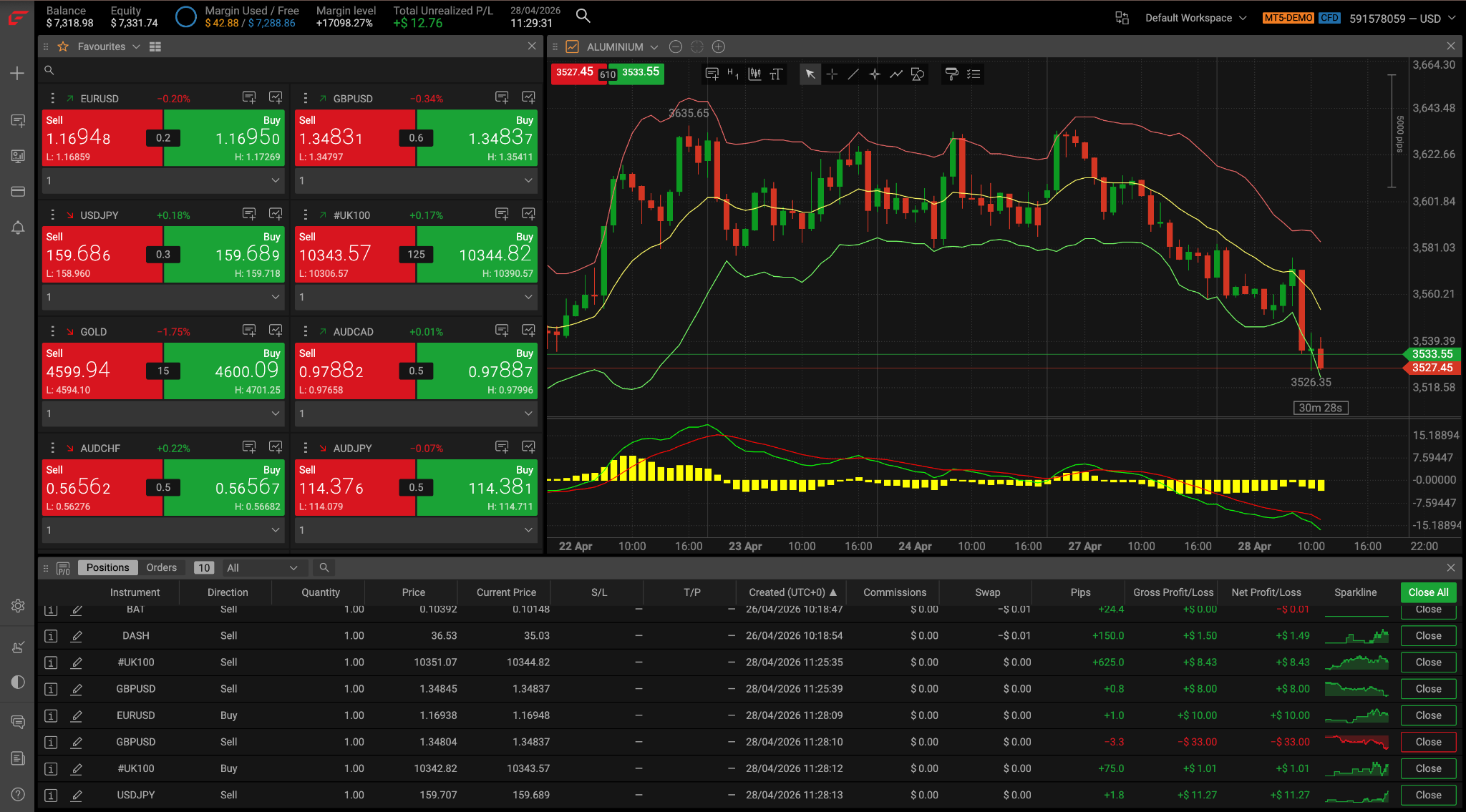
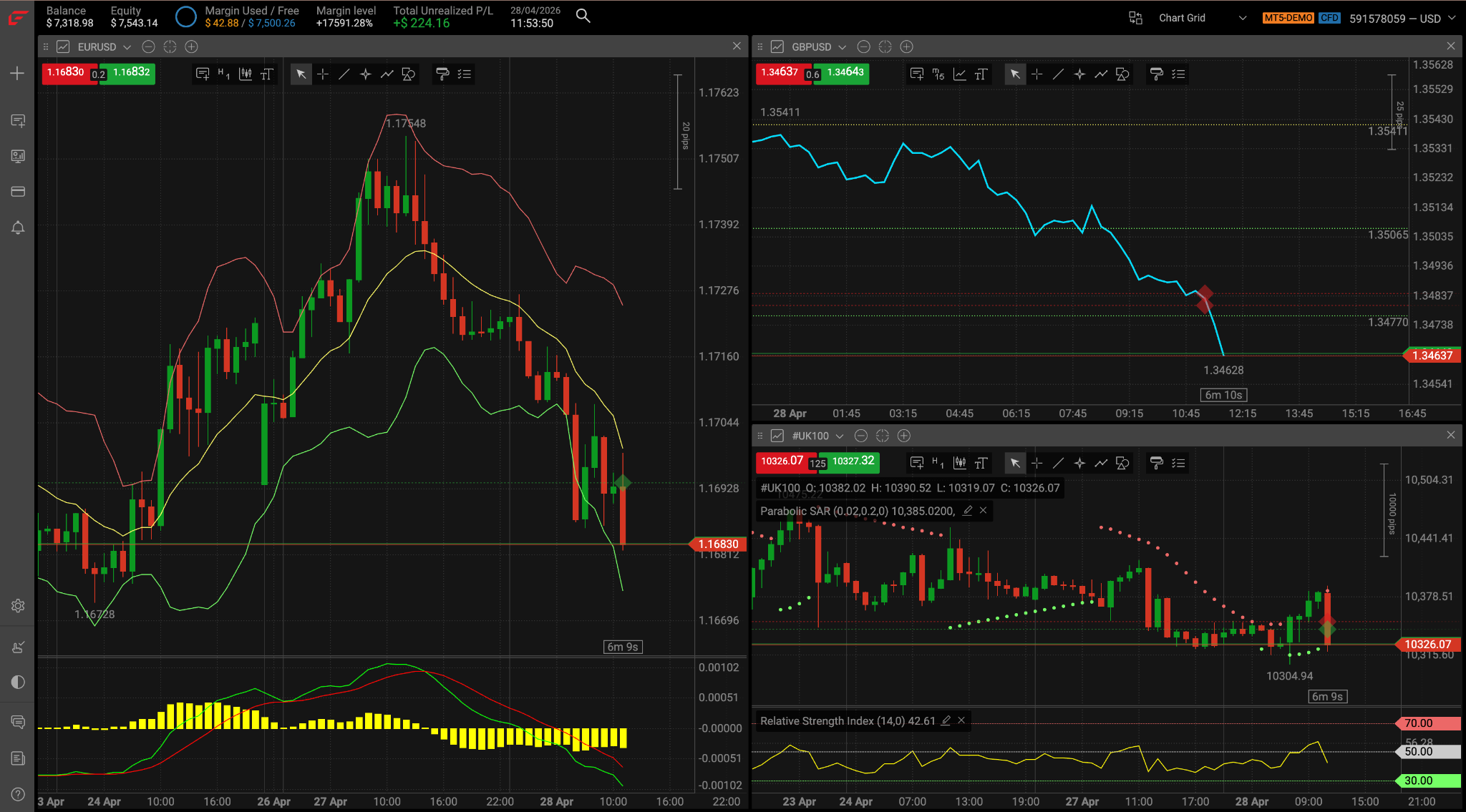
The proprietary charting within the platform did not disappoint. 50+ technical indicators include momentum, reversal, volatility, and volume studies. Drawing tools range from the basic trendline to Fibonacci Fans, Pitchforks, and ABCD pattern recognition. 15 timeframes from 1 minute to 1 month let you easily zoom your analysis in and out.
Orders
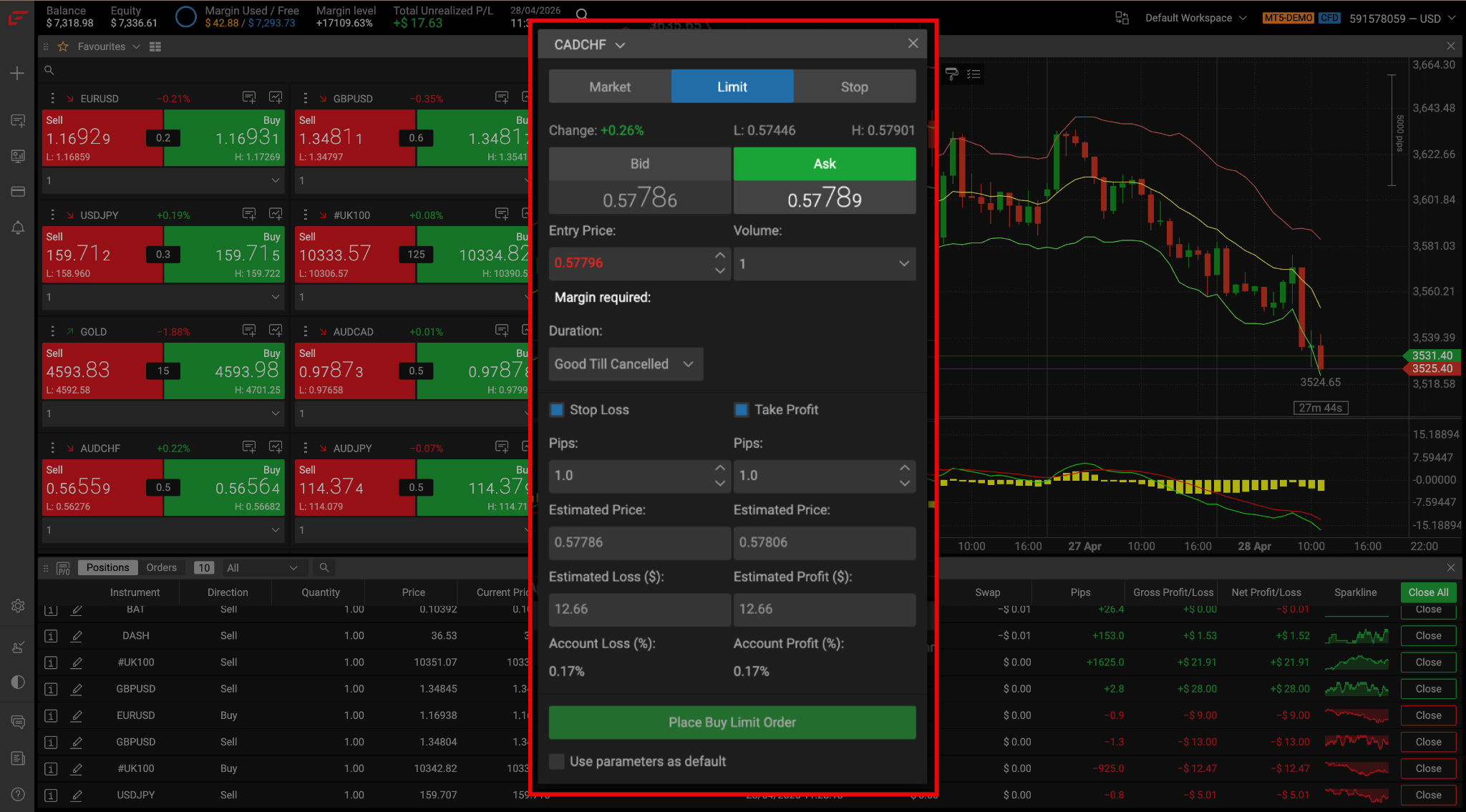
The order ticket features all standard order types, including market, limit, and stop losses. In the case of pending orders, you can specify the time limit of the order (good till canceled (GTC) or good till a specific date). While the FxPro platform lacks trailing stop-loss orders, these are available in MetaTrader and cTrader.
News
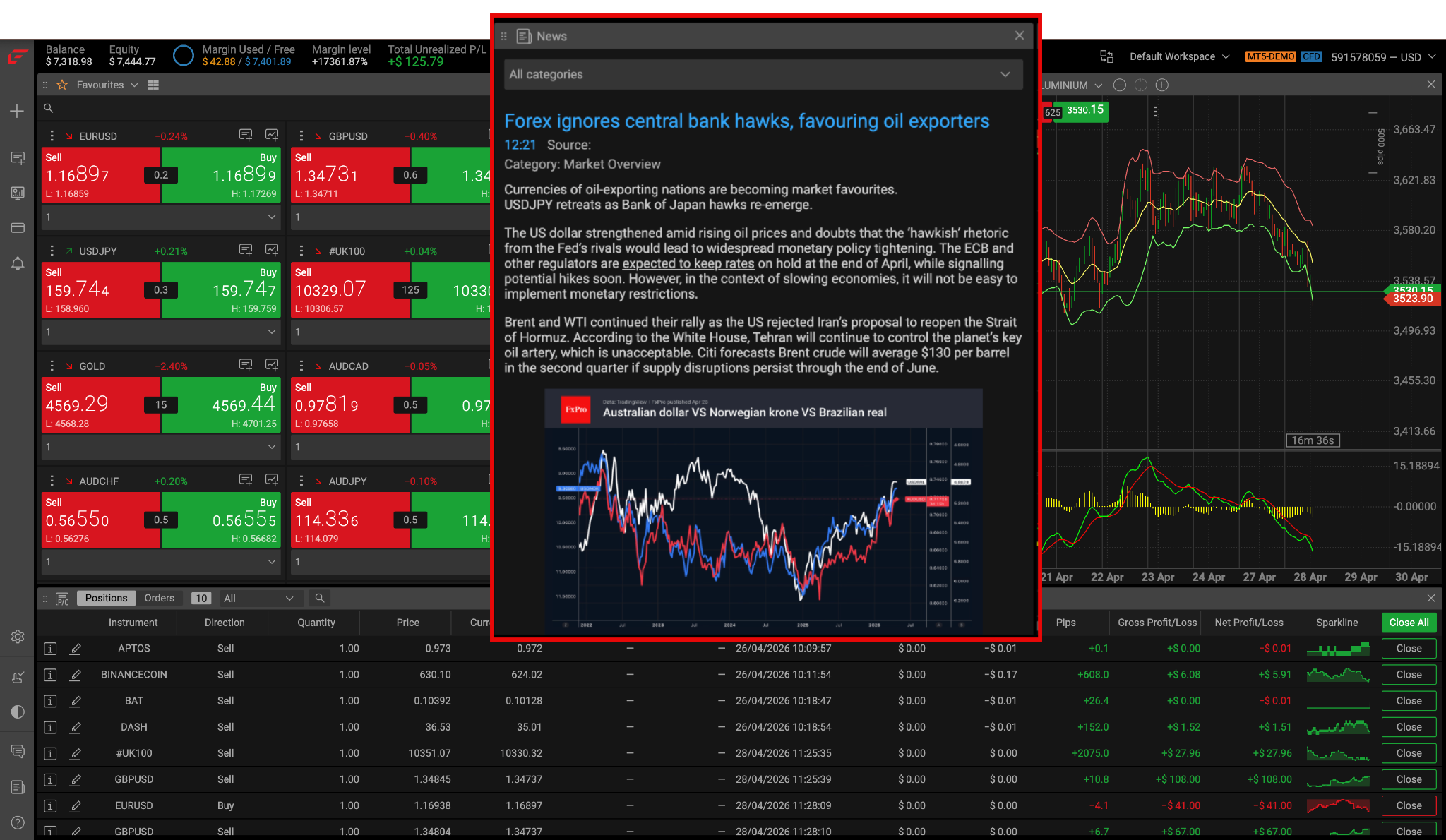
The research section includes FxPro’s in-house market commentary, including Wave analysis across many assets. I found the Pro News Weekly updates useful for keeping track of major market developments. But the news flow did not feel as fast or comprehensive as feeds offered by Reuters or Bloomberg.
Alerts
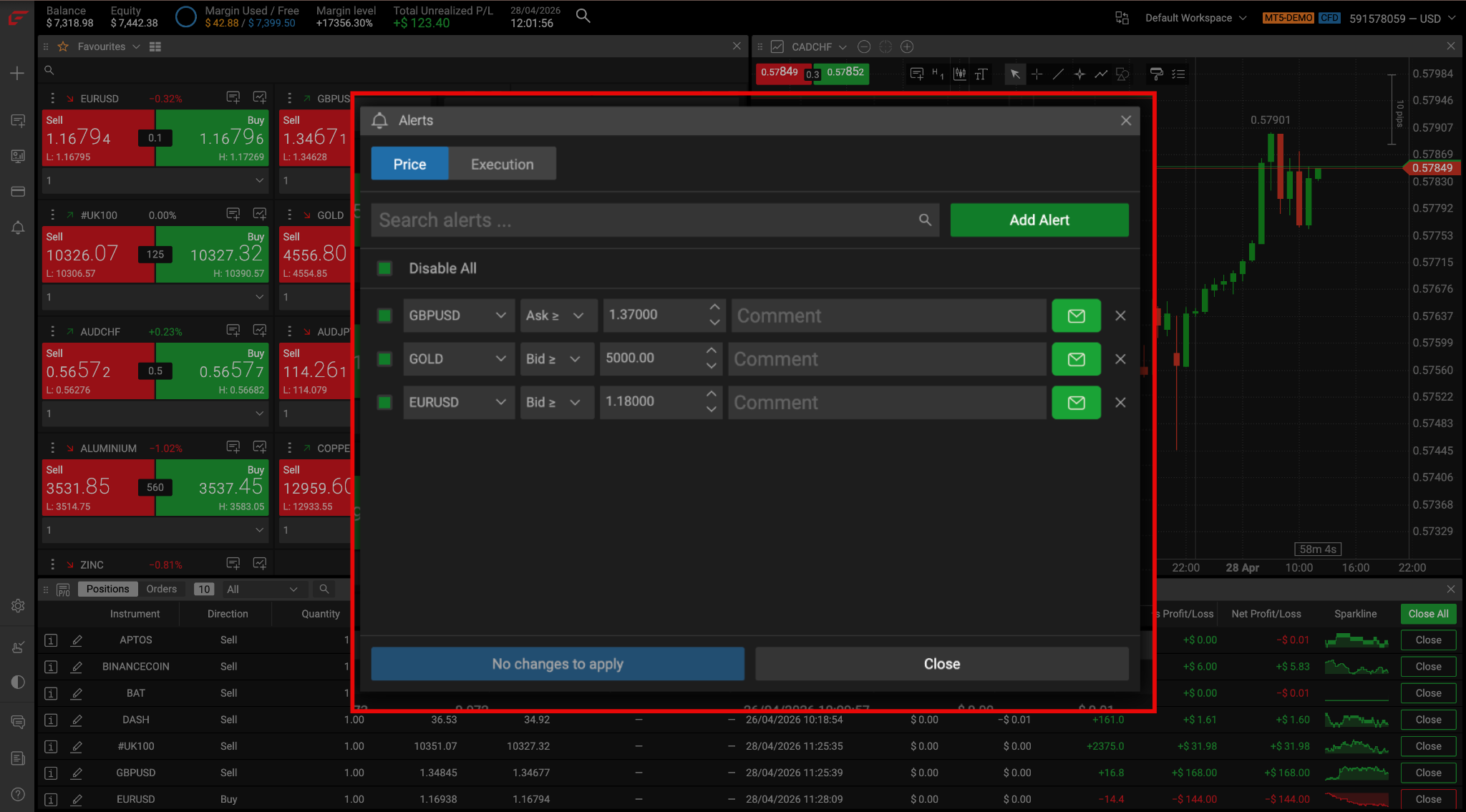
The alerts tool in WebTrader allows you to be notified when the price reaches a preset level and when your orders are executed. You can be notified by an in-platform notification or via email. I especially like this tool as it allows you to take a break from the screen without missing important price moves.
Economic Calendar
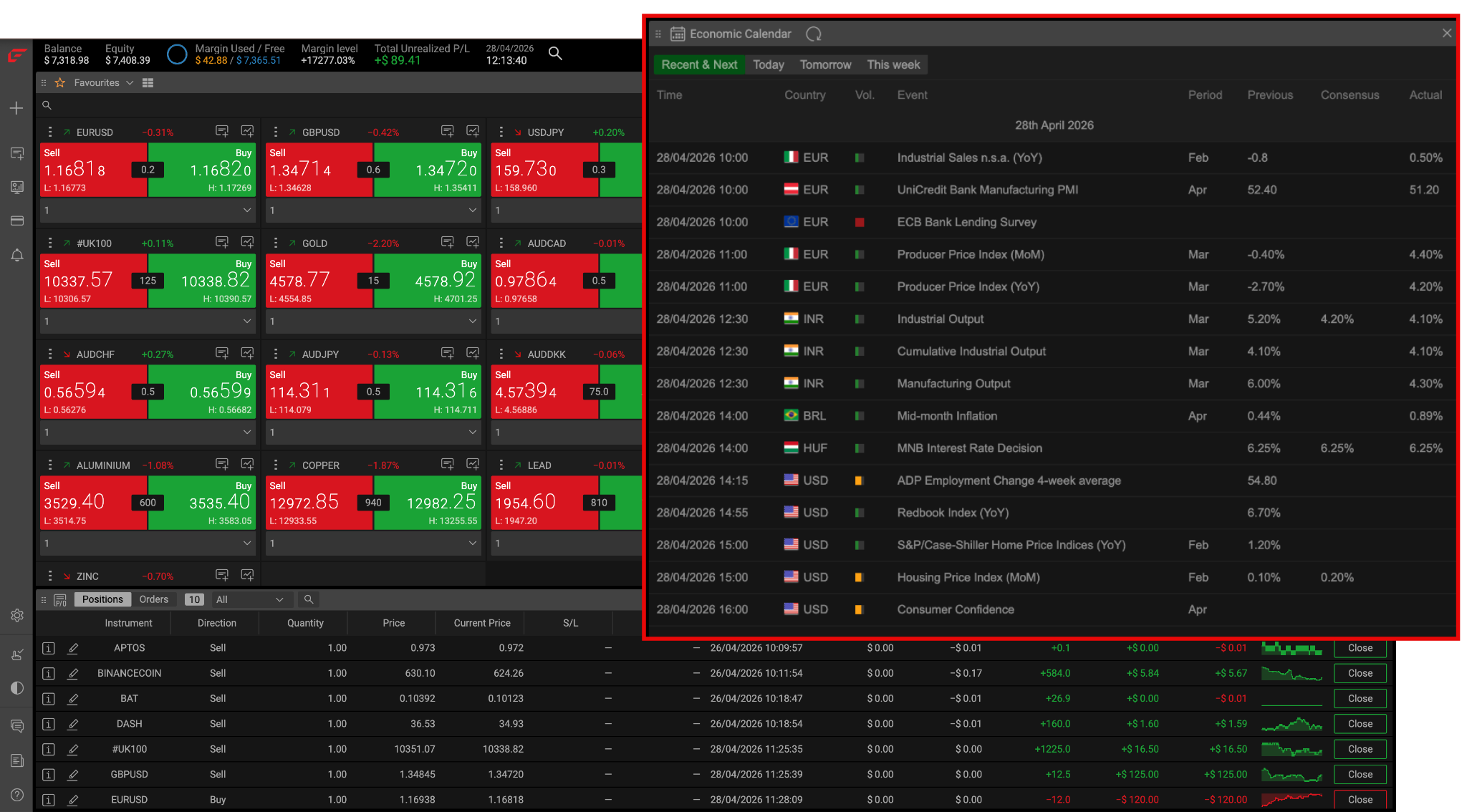
You won’t have to leave the platform to get key economic data. WebTrader features a built-in economic calendar that covers analyst consensus and previous/actual figures.
FxPro WebTrader: My Key Takeaways
I found the FxPro WebTrader to be intuitive and well-designed. With one-click trading and trading from the chart, it’s a good fit for day traders. It’s a bonus that practical features like an economic calendar and live chat support are integrated. One drawback is that the platform is only available in English.
FxPro Mobile App
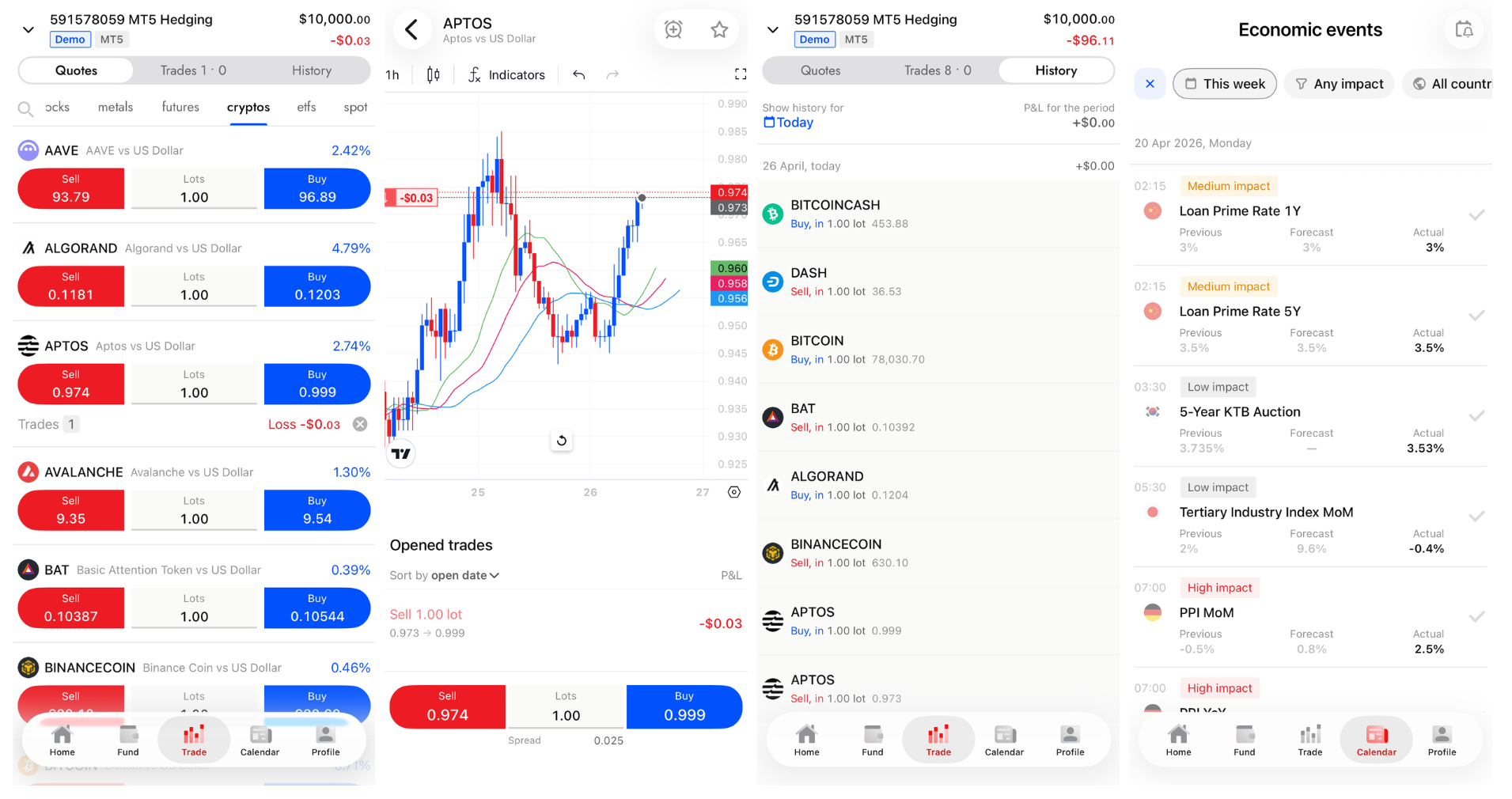
The FxPro mobile app, available for Android and iOS, allows you to trade and manage your account on the go. I tested the FxPro mobile app using an iPhone 15 Pro Max. You can easily switch between demo and live trading, fund your account, and access live support from a single login.
Advanced charting from TradingView features 100+ technical indicators, 30 drawing tools, 9 time frames, and 12 chart types — an upgrade from the basic charting on most broker-built apps.
The app features all standard order types, including market, limit, and stop losses. When checking security features, I confirmed that two-factor authentication is available.
FxPro Mobile App: My Key Takeaways
I liked the clean, intuitive design, making a contrast with the dated feel of the MetaTrader 4 app. The charting upgrade to TradingView means it can accommodate the most sophisticated technical analysts. 1-tap trading makes it easy to get in and out of the market fast while you are out and about. Like the web platform, the FxPro app features the convenience of a built-in economic calendar. But I also noted that the app could be improved by adding a news feed and price alerts.
FxPro Execution
I confirmed through FxPro’s Order Execution Policy and legal documentation that the broker acts as the execution venue for client CFD trades. Orders are executed on an OTC basis, rather than a centralized exchange. I verified that FxPro uses a no-dealing-desk execution model, designed to reduce intervention in client orders.
Tradable Instruments
FxPro offers an impressive range of 2,100+ tradable instruments. Markets include forex, metals, energies, soft commodities, indices, shares, ETFs, and crypto. The lineup includes CFDs on both spot and futures markets. In my analysis, FxPro’s commodity count (40) is four times the industry median of 5–10, making it a strong choice for commodity-focused traders. Crypto coverage (37 instruments) similarly outpaces the 10–20 median. The range of 75 forex pairs is also at the upper end of industry averages.
- Instruments2,100+
- Forex pairs75
- Commodities40 (industry median 5–10)
- Cryptocurrencies37
| Instrument | Number | Type | Industry Average |
| Forex Pairs | 75 | Major, Minor, Exotic | 30 – 75 |
| Commodities | 40 | Metals, Energies, Softs, Spot, Futures | 5 – 10 |
| Indices | 30 | Major, Minor, Spot, Futures | 5 – 10 |
| Stocks | 1,862 | Belgium, France, Germany, Netherlands, Portugal, Switzerland, United Kingdom, United States | 200 – 300 |
| ETFs | 46 | United States | N/A |
| Cryptocurrencies | 37 | Major and Minor | 10 – 20 |
FxPro offers a comfortably better- than- average range of instruments that can support a wide variety of trading strategies. I liked that both spot and futures markets are available in the cases of commodities and indices. And when it comes to a popular commodity like gold, you have plenty of flexibility with access to XAU/USD, XAU/EUR, Gold Oz, and Gold Gram contracts. One limitation I noticed was the absence of bond CFDs.
What Can You Trade with FxPro?
To better illustrate the range of instruments available at FxPro, I compiled samples from various asset classes:
| Forex Major | Forex Minor |
| EUR/USD | USD/JPY | USD/CHF | AUD/USD | GBP/JPY | NZD/JPY | EUR/GBP | EUR/AUD |
| Forex Exotic | Indices |
| USD/THB | USD/PLN | USD/MXN | USD/RUB | UK 100 | Spain 35 | AUS 200 | Hong Kong 50 |
| Energies | Metals |
| Natural Gas | WTI Crude Oil | Brent Crude Oil | Silver | Palladium | Platinum | Gold |
| Soft Commodities | Shares |
| Cocoa | Corn | Soybeans | Wheat | Apple | HSBC | Lufthansa | Trustpilot |
| ETFs | Cryptocurrencies |
| SPDR S&P 500 | iShares Silver Trust | Grayscale Bitcoin | Vanguard Total Bond Market Index | Polkadot | TRON | Cardano | Trump Coin |
Customer Support
FxPro offers 24/5 support in 20+ languages (Verified May 2026). You can get help via live chat, email, and phone. I conducted my tests over a two-week period and had a mixed experience. Wait times via live chat averaged 3–4 minutes, slower than the 1–2 minute median I see at most large retail brokers. And I was not always able to get a clear answer. By phone and email, I had a more positive experience.
- Hours24/5 in 20+ languages
- ChannelsLive chat · email · phone
- Live chat wait3–4 minutes in my tests
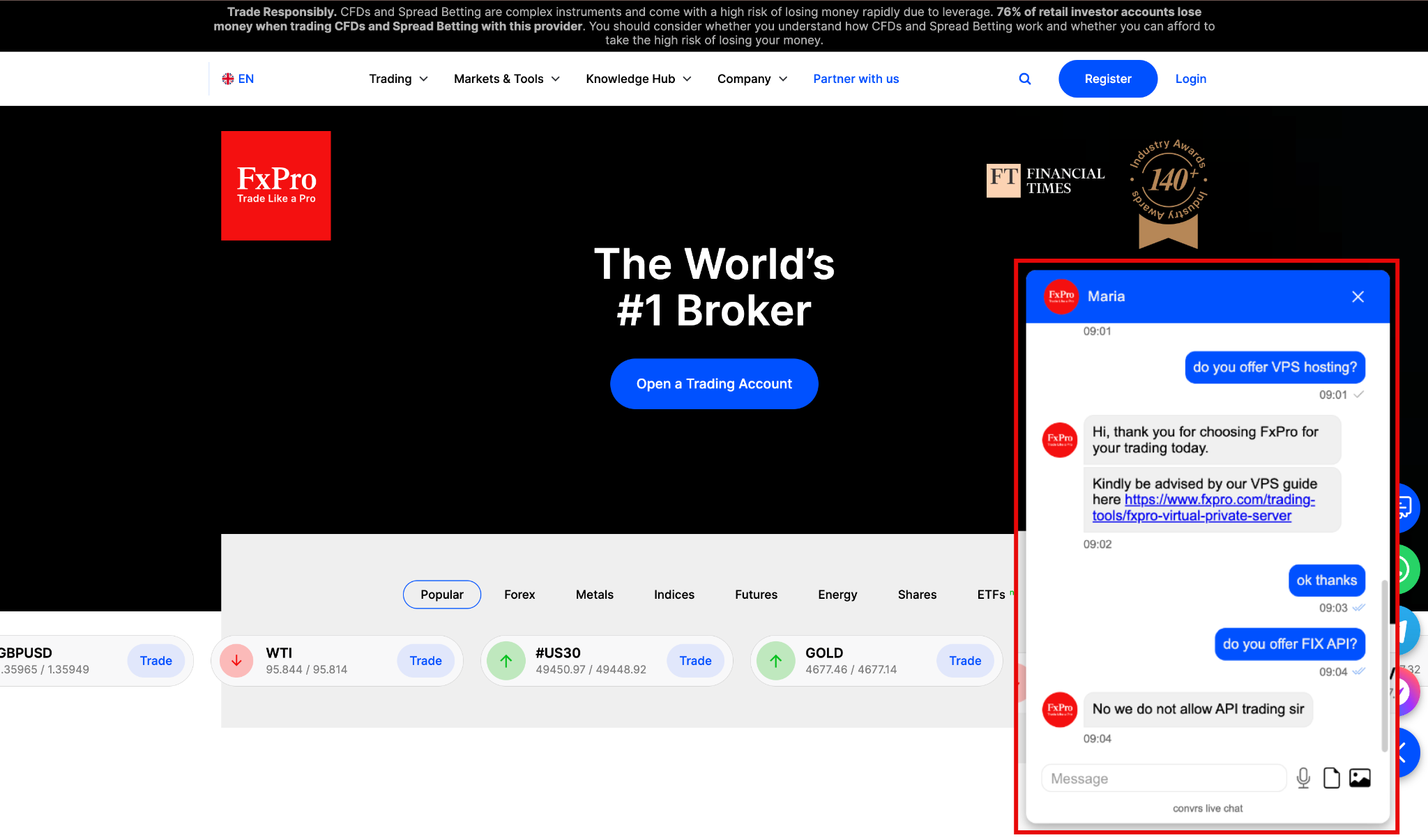
FxPro Customer Support Test
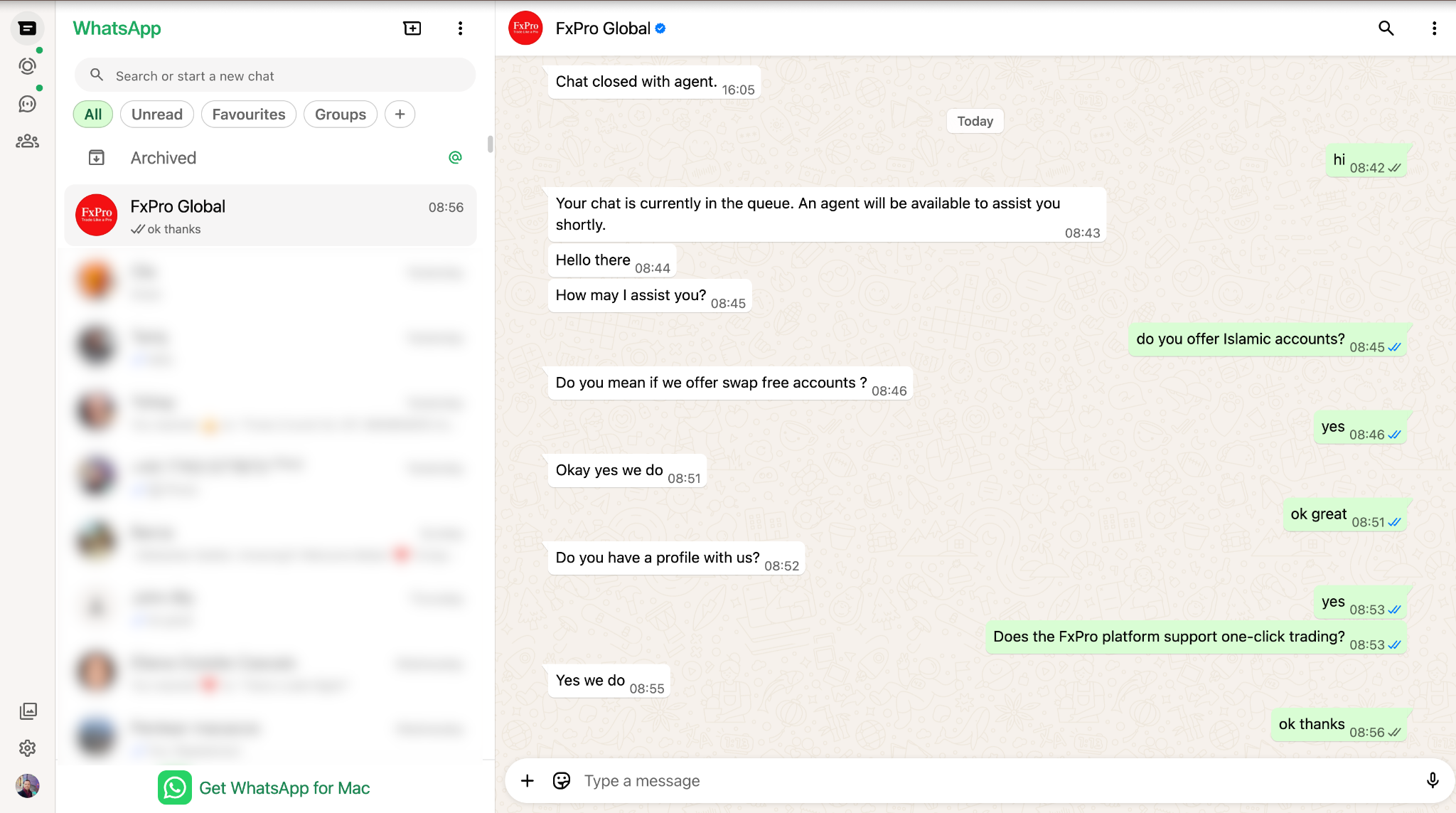
I made dozens of inquiries during my test period, covering topics including platforms, regulation, fees, and more. For example, via chat, I asked whether FxPro offers VPS hosting and whether an Islamic account is available.
By live chat, I usually had to wait a couple of minutes. Email responses typically arrived the same business day. Phone calls were answered within a few rings. I found the support experience inconsistent, as the depth of knowledge varied between agents. In one instance via chat, a representative was unable to explain the inactivity fee.
| Languages |
| English, Chinese, Spanish, Portuguese, French, Polish, Italian, German, Romanian, Russian, Korean, Japanese, Vietnamese, Thai, Turkish, Arabic, Indonesian, Malaysian, Hungarian |
Deposit and Withdrawal
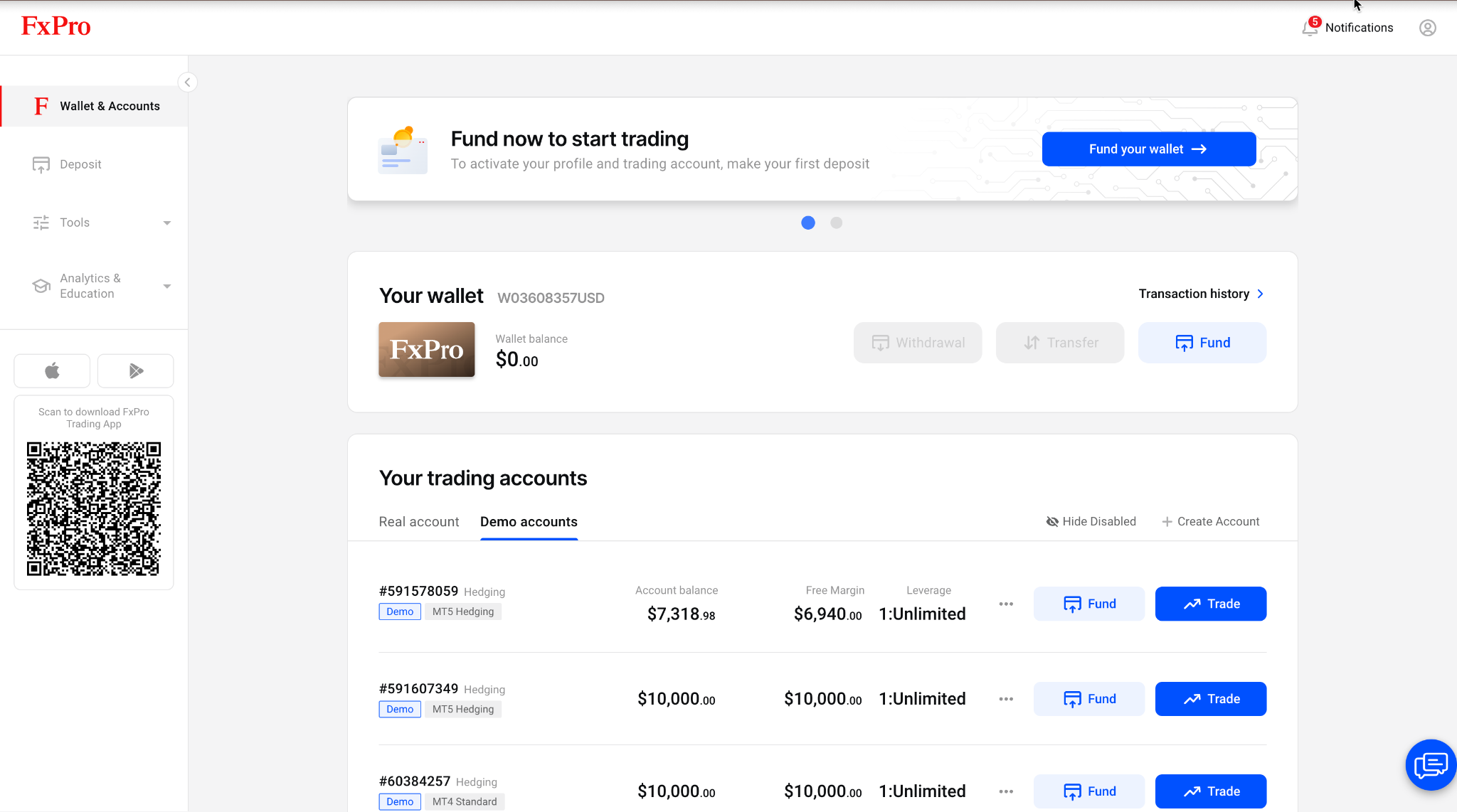
FxPro offers a variety of deposit and withdrawal methods, including bank wire, credit/debit card, digital wallet, and crypto. The broker also offers an innovative tool called the FxPro Wallet, which acts as a central hub where you can store funds and transfer them between trading accounts. FxPro’s offering is straightforward and fee-free (verified May 2026) across seven methods, stronger than the typical CFD broker setup. According to the broker, processing times vary by payment method.
- MethodsBank wire · cards · e-wallets · crypto, seven in all
- Fees0% on deposits and withdrawals
- ToolFxPro Wallet for moving funds between accounts
How Did We Test the Broker's Deposit and Withdrawal Process?
Please note that I did not test processing times with a live account.
FxPro Wallet
The FxPro wallet serves as a central funding account where clients can hold their balance and transfer funds between different accounts. I rate the setup a convenient feature for managing multiple accounts without having to repeatedly deposit or withdraw funds.
How Do You Deposit Money with FxPro
| Method* | Fees | Processing Time |
| Local Bank Wire | 0% | 15 minutes |
| Credit/Debit Card | 0% | 15 minutes |
| Crypto** | 0% | 15 minutes |
| SticPay | 0% | 15 minutes |
| Google Pay | 0% | 15 minutes |
| PayPal*** | 0% | 15 minutes |
| Skrill*** | 0% | 15 minutes |
*Payment methods vary by region
**Crypto payments include TON, ADA, LTC, SOL, USDC ERC20, XLM, and XRC
***Only available for clients in the EU
How Do You Withdraw Money from FxPro
| Method* | Fees | Processing Time |
| Local Bank Wire | 0% | 3-5 working days |
| Credit/Debit Card | 0% | 3-7 working days |
| Crypto** | 0% | 1 working day |
| SticPay | 0% | 1 working day |
| Google Pay | 0% | 1 working day |
| PayPal*** | 0% | 1 working day |
| Skrill*** | 0% | 1 working day |
*Payment methods vary by region
**Crypto payments include TON, ADA, LTC, SOL, USDC ERC20, XLM, and XRC
***Only available for clients in the EU
Overall, Deposits and Withdrawals are a strength at FxPro. The zero-fee policy on both deposits and withdrawals removes a cost drag that many brokers impose. The main caveat: some methods (PayPal, Skrill) are restricted to EU clients.
Account Types and Terms
FxPro offers Standard, Raw+, Elite, and cTrader accounts. I rate the lineup flexible enough for different trading styles and experience levels. Beginners can opt for simpler, spread-based pricing. Meanwhile, active traders have access to raw spreads and commission structures. High volume traders can also earn rebates. The broker supports demo and Islamic accounts. Another advantage I noted is the absence of a fixed minimum deposit. I opened a Standard demo account in just 5 minutes via the online portal.
- AccountsStandard · Raw+ · Elite · cTrader
- Minimum depositNone fixed
- RebatesAvailable on the Elite account
- Swap-freeIslamic accounts available
How to Open an Account with FxPro
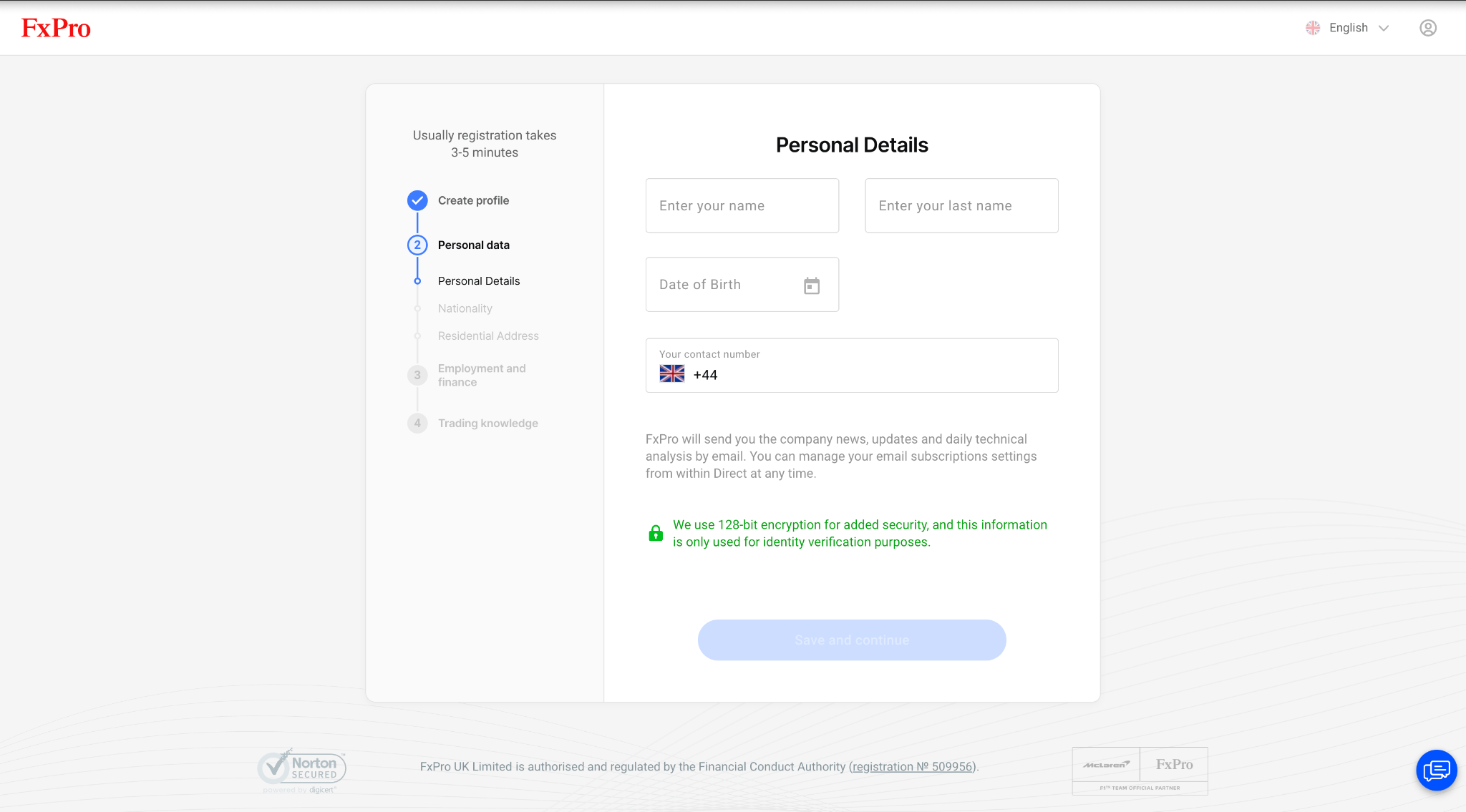
To open an account with FxPro Global Markets Limited, you must go through the following steps:
- Click “Register” at the top right of the FxPro website.
- State your country of residence, your email, and create a password.
- Enter your personal details: full name, date of birth, and phone number.
- Enter your nationality and employment information.
- Provide financial information, including annual income and net worth
FxPro Account Types
| Account Feature | MT4/5 Standard | MT4/5 Raw+ | MT4/5 Elite | cTrader |
| FX Majors | All-inclusive spread from 1.2 Pips | From 0 pips + commission $3.5/side | From 0 pips + commission $3.5/side | Spread + $35 per $1 million traded (upon opening and closing a position |
| Gold | All-inclusive spread from 25 cents | From 10 cents + commission $3.5/side | From 10 cents + commission $3.5/side | Spread + $35 per $1 million traded (upon opening and closing a position |
| Bitcoin | All-inclusive spread from 30 USD | All-inclusive spread from 15 USD | All-inclusive spread from 15 USD | Marked-up floating spreads & zero commissions |
| Other Instruments | Floating spreads | Floating spreads & zero commissions | Floating spreads & zero commissions | Marked-up floating spreads & zero commissions |
| CFD Instruments | Forex, Metals, Indices, Energy, Futures, Cryptocurrencies (Stocks/ETFs available only on MT5) | Forex, Metals, Indices, Energy, Futures, Cryptocurrencies (Stocks/ETFs available only on MT5) | Forex, Metals, Indices, Energy, Futures, Cryptocurrencies (Stocks/ETFs available only on MT5) | Forex, Metals, Indices, Energy, Futures, Cryptocurrencies |
| Platforms | FxPro WebTrader, FxPro Mobile app, MetaTrader 4/5 | FxPro WebTrader, FxPro Mobile app, MetaTrader 4/5 | FxPro WebTrader, FxPro Mobile app, MetaTrader 4/5 | cTrader (desktop, web, mobile) TradingView (desktop, web, mobile) |
| Minimum Deposit | $0 | $100 | $1,000 | $0 |
| Minimum Stop/Limit Levels | 1 pip from current/entry price for most majors; for other instruments, check specifications | 1 pip from current/entry price for most majors; for other instruments, check specifications | 1 pip from current/entry price for most majors; for other instruments, check specifications | No Minimum |
| Position Management System | MT4 – Hedging MT5 – Choice of Netting or Hedging | MT4 – Hedging MT5 – Choice of Netting or Hedging | MT4 – Hedging MT5 – Choice of Netting or Hedging | Hedging |
| Rebates | No | No | Yes, starting from $1.50 per lot | No |
The MT4/MT5 Standard account is best suited to casual traders seeking simple spread-only pricing, while the MT4/MT5 Raw+ account caters to active traders looking for tighter spreads and lower trading costs. Cost-saving rebates are available via an MT4/MT5 Elite account. The cTrader account is geared towards advanced traders who prefer the cTrader and TradingView platforms.
Minimum deposit figures and commission/rebate rates verified May 2026. Confirm current rates at FxPro.com before opening an account.
The table below explains the difference between hedging and netting execution methods:
| Netting | Hedging |
| All positions for the same instrument are combined into one net position. Simpler for beginners and may be more suitable for strategies that do not require simultaneous buy and sell positions. | Allows for multiple positions in the same asset, both in the same and opposite directions. Suited for traders who need greater flexibility and control over their trading activities, especially in volatile markets. |
Professional Accounts
For traders in the EU, FxPro offers professional accounts with leverage of up to 1:500. In order for you to be eligible to classify as a professional, you will need to meet two of the following criteria:
- You have carried out transactions, in significant size, on the relevant market at an average frequency of 10 per quarter over the previous four quarters.
- You work or have worked in the financial sector for at least one year in a professional position, which requires knowledge of the transactions or services envisaged.
- The size of your financial instrument portfolio, defined as including cash deposits and financial instruments, exceeds €500,000.
Demo Account
FxPro offers demo trading via MT4, MT5, cTrader, TradingView, and the FxPro WebTrader platform and mobile app. You can also test both the Standard account and the Raw+ account via demo accounts. Demo accounts feature live quotes and are a great way to become familiar with platforms and experiment with trading strategies. I ran the Standard demo for multiple sessions, and the live quotes made it a useful pre-live sandbox.
Islamic Account
FxPro offers an Islamic account designed to comply with Sharia law, allowing traders to avoid overnight interest charges. Swap-free accounts are only offered for religious purposes. In order to set your trading account to swap free, FxPro requires a copy of any official documentation that states your religion (birth certificate, marriage certificate, etc.) Alternatively, you can provide an official letter from the Imam to verify the religion. The swap-free account legal terms can be found here.
What Leverage Does FxPro Offer?
Leverage lets you borrow capital to open positions larger than what your capital larger than your account balance alone would allow. This amplifies your potential gains and losses, making risk management an essential part of any leveraged trading strategy.
For the FxPro Global Markets Limited entity, the maximum leverage is 1:200. This means that with an account of $1,000, you can control up to $200,000 worth of positions in the market. This is an unusually high level of leverage and very risky to use.
Leverage is often described as a ‘double-edged sword’ as it can hurt you as much as it helps you. Traders should keep in mind that it can amplify both their profits and their losses.
Leverage varies by asset class, as illustrated in the following table:
| Asset Class | Maximum Available Leverage |
| Forex Majors | 1:200 |
| Forex Minors | 1:200 |
| Spot Gold | 1:200 |
| Spot Silver, Platinum & Palladium | 1:200 |
| Gold Futures | 1:200 |
| Aluminium, Copper, Lead & Zinc | 1:40 |
| Spot Index Majors | 1:200 |
| Spot Index Minors | 1:100 |
| Index Futures | 1:50 |
| Spot Energies | 1:200 |
| Energy Futures | 1:200 |
| Commodity Futures | 1:50 |
| Shares and ETFs | 1:25 |
| Cryptocurrencies | 1:20 |
(Verified May 2026)
Risk warning: 76% of retail investor accounts lose money when trading CFDs with this provider. Ensure you understand how CFDs work and whether you can afford the high risk of losing your money.
FxPro Restricted Countries
FxPro accepts clients from the majority of countries worldwide. However, it does not onboard residents of the following countries:
Afghanistan, Canada, French Southern Territories, Kosovo, Pitcairn, Sudan, Yemen, Aland Islands, the Democratic Republic of the Congo, Guam, Lao People’s Democratic Republic, Portugal (since 2022), Syrian Arab Republic, Zimbabwe, Algeria, Côte D’Ivoire, Guyana, Puerto Rico, Trinidad and Tobago, Tunisia, American Samoa, Cuba, Iran, Sint Maarten (Dutch part), Spain, United States, Azerbaijan, Curacao, Liberia, Myanmar, Somalia, United States Minor Outlying Islands, Belgium, Equatorial Guinea, Israel, Libya, Bonaire, Sint Eustatius and Saba, Ethiopia, Norfolk Island, South Sudan, Vanuatu, Bosnia and Herzegovina, France, North Korea, Democratic People’s Republic of Korea (DPRK), Northern Mariana Islands, Virgin Islands, the United States.
List verified May 2026. Check FxPro.com for the current list of accepted countries, as this may change.
Research
FxPro offers a steady stream of Elliott Wave analysis and macro commentary. And the Squawk fires market-moving alerts in near real-time. Trading Central (funded accounts only) adds further value with actionable trade ideas. The offering best suits active intraday and swing traders who use technical and news-driven setups.
- ContentElliott Wave analysis · macro commentary
- AlertsFxPro Squawk in near real-time
- Trading CentralFunded accounts only
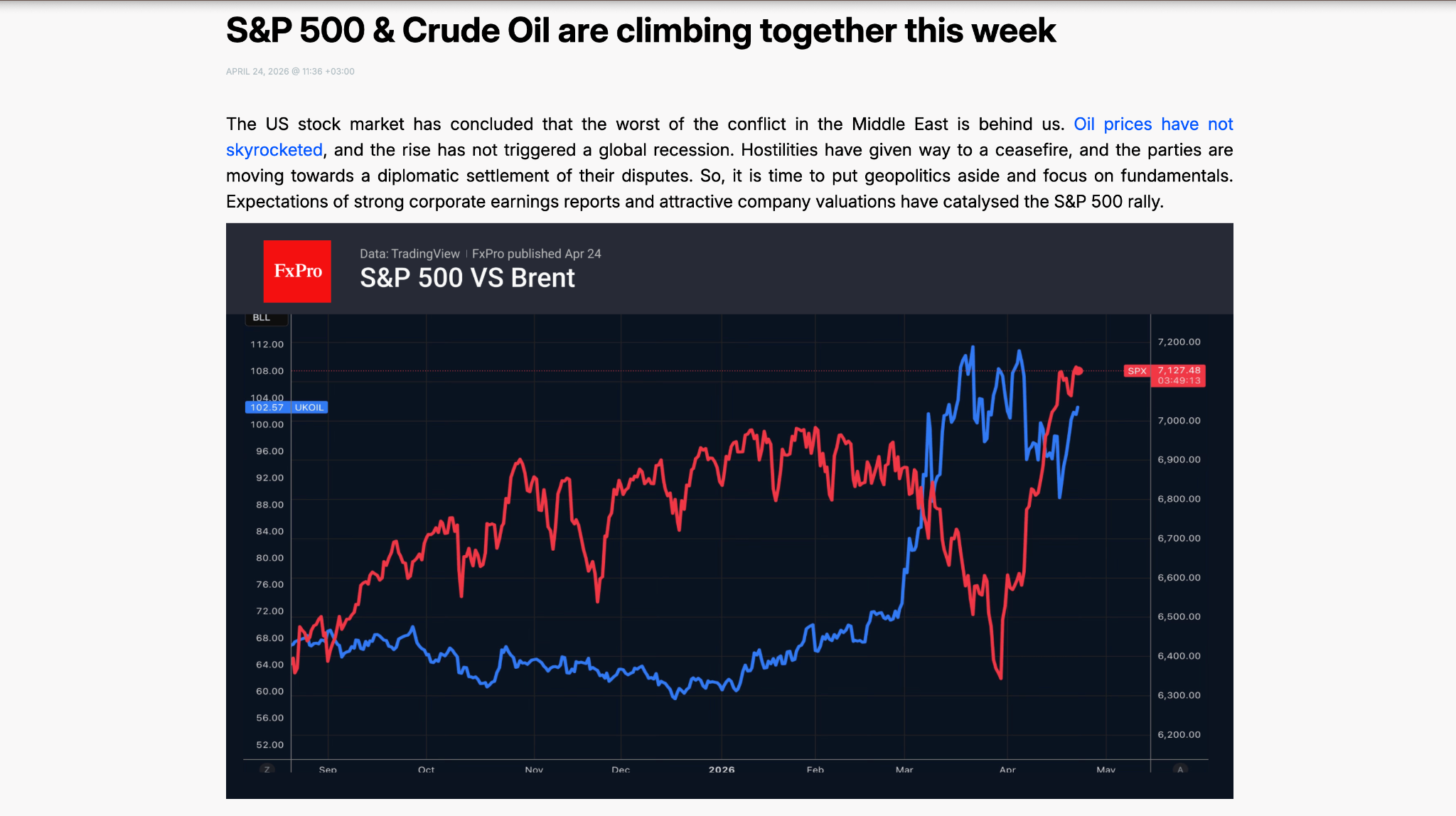
FxPro’s research is geared towards active traders looking for timely market commentary. The broker has a dedicated domain – fxpro.news – where you can find macroeconomic analysis and technical setups.
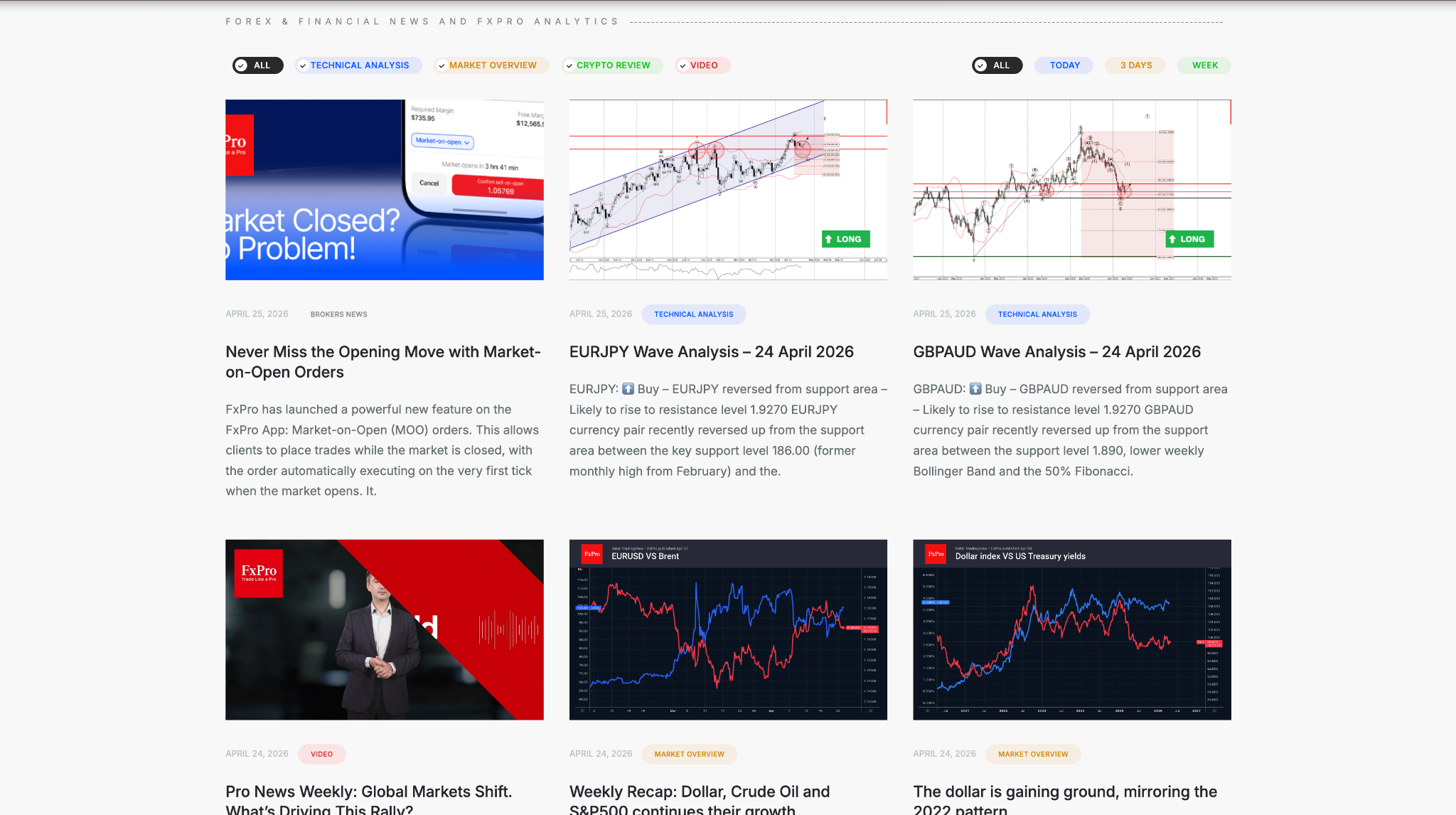
The Market Overview section focuses on macro themes. Technical traders can find a good source of ideas from regular Elliott Wave analysis.
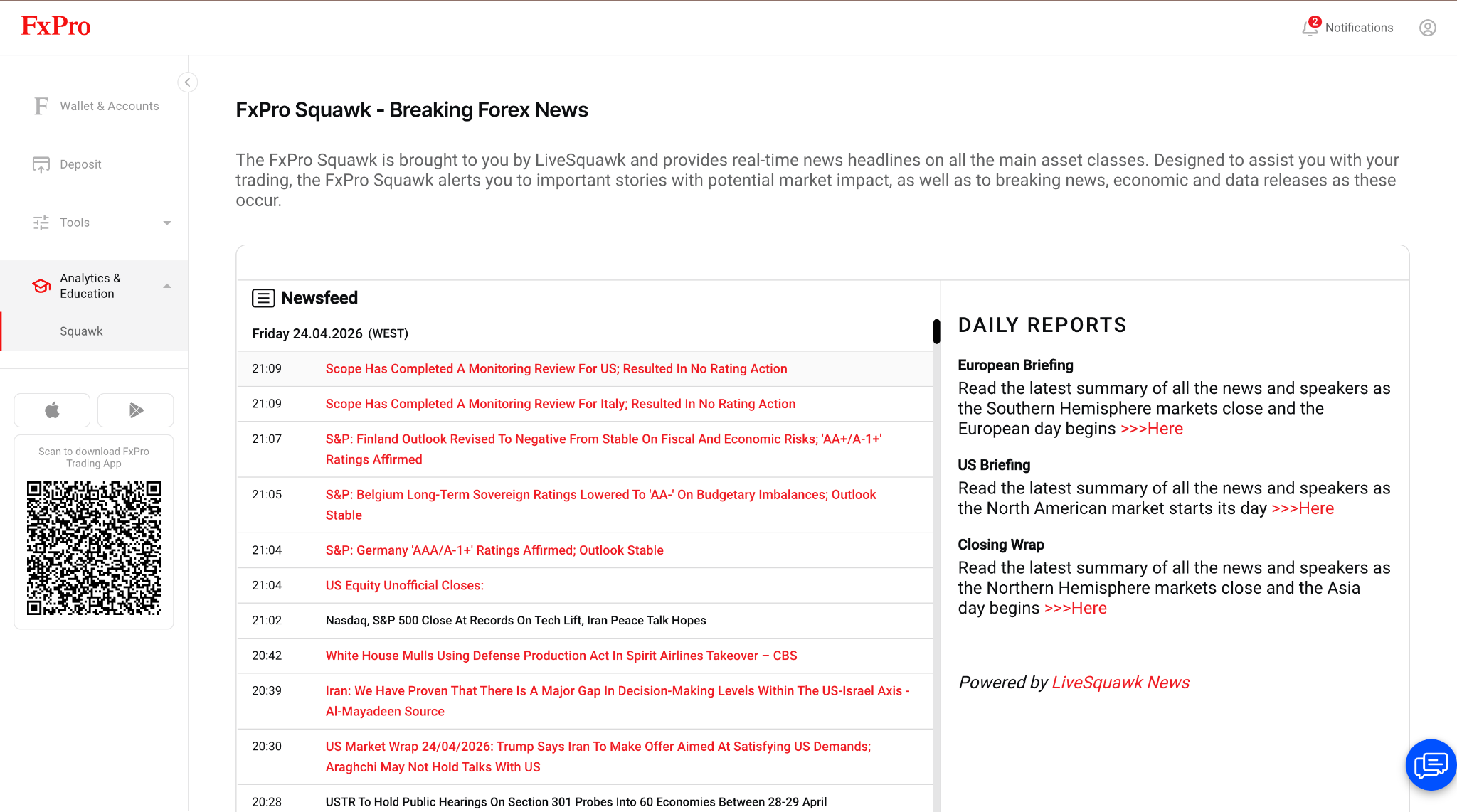
FxPro Squawk delivers real-time alerts. The tool is available in the client portal and is especially useful to news traders, day traders, and scalpers. During my testing, I received timely and useful headlines relating to the crisis in the Strait of Hormuz.
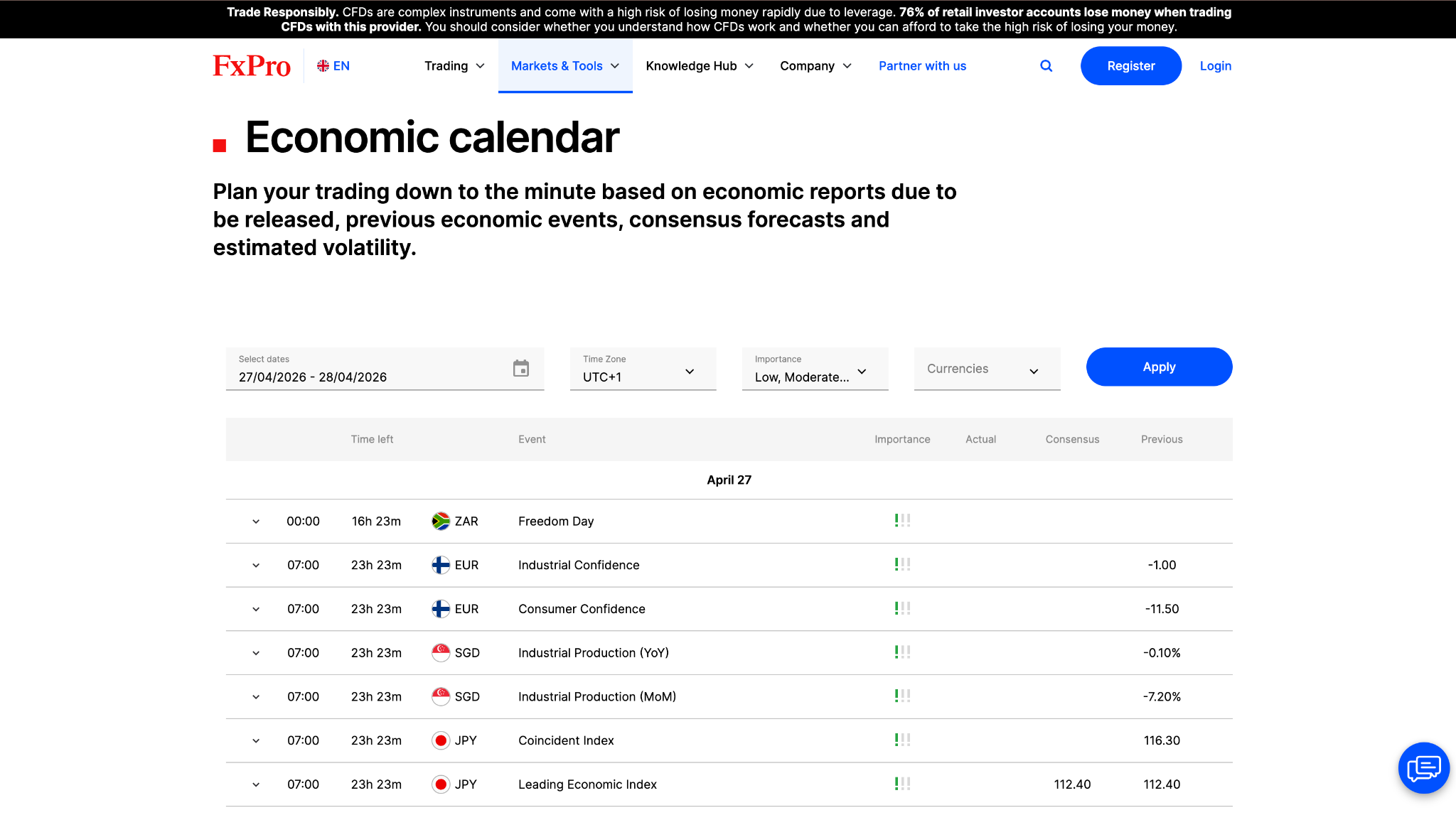
The economic calendar, also available through the client portal, helps traders keep tabs on major upcoming releases.
Education
FxPro offers strong educational resources in text and video format. I judged that the subject matter is most useful to beginners and intermediate traders. Key topics like trading psychology are covered through interactive courses on the website. The broker previously provided live webinars, but I noted that they are not currently being scheduled.
- FormatsText and video, interactive courses
- SuitsBeginners and intermediate traders
- MissingLive webinars not currently scheduled
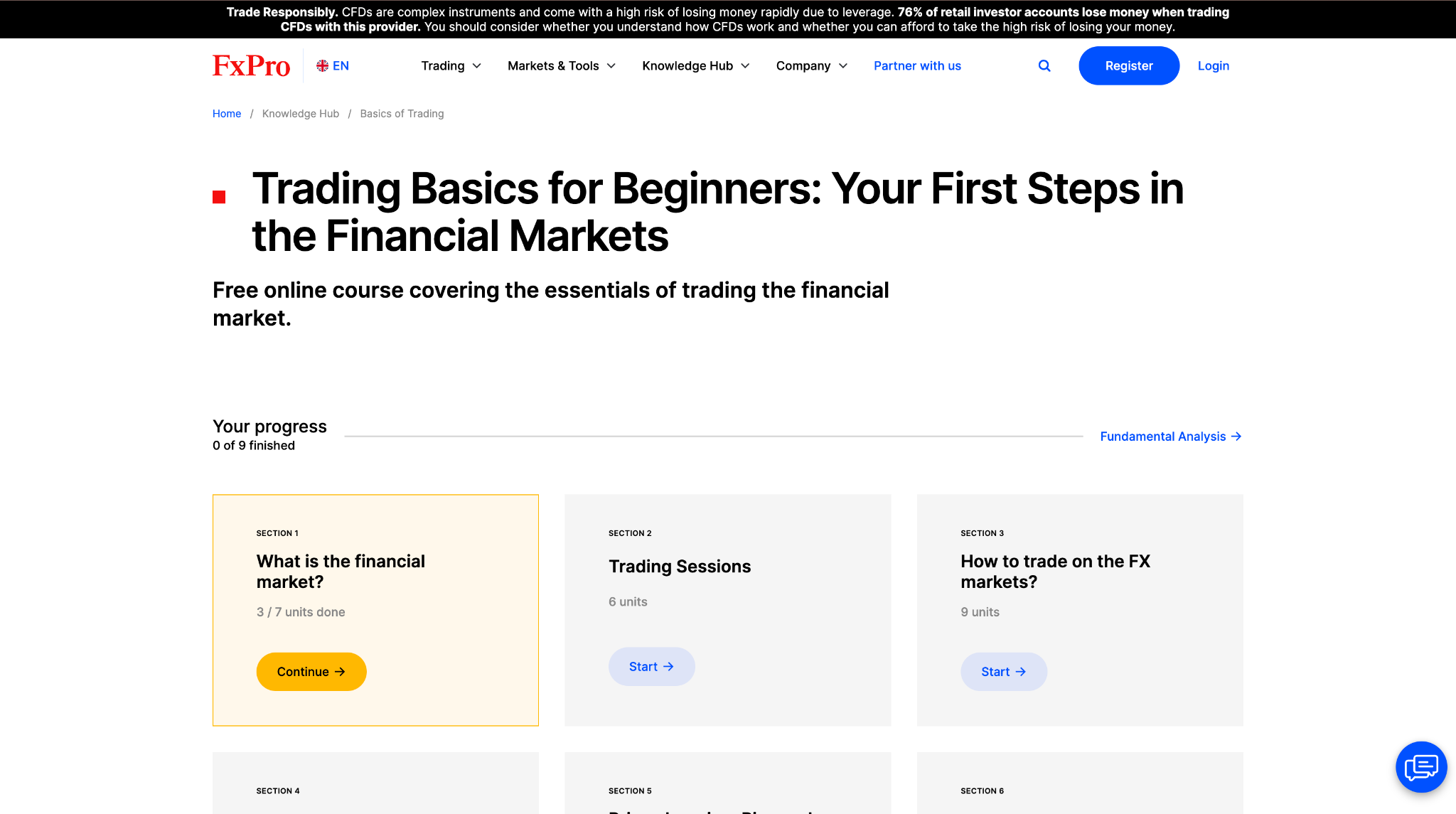
FxPro’s courses are presented in a minimalist format and cover key topics like chart patterns and risk management. Simple cards guide you through each section and progress tracking is included.
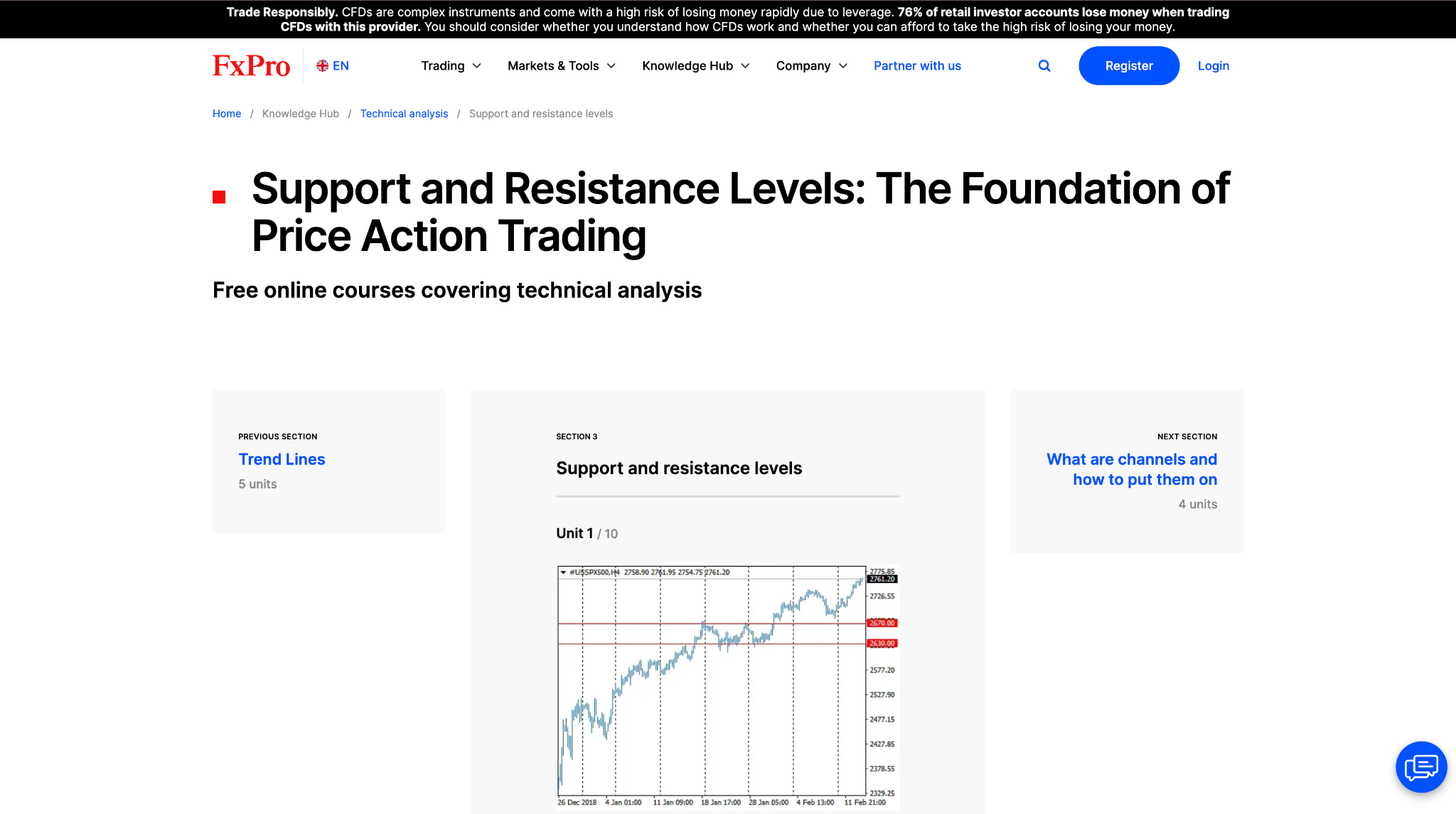
The Trading Basics courses in the Knowledge Hub are a good place for beginners to get started. I walked through the technical analysis courses, which include topics like classic chart patterns.

The education section also features in-depth courses from CME Group, delivered in video and text format. Tests at the end of each module help reinforce learning. These courses tackle some more advanced subject matter. For example, the Trading Psychology module offers professional insights into emotional intelligence.
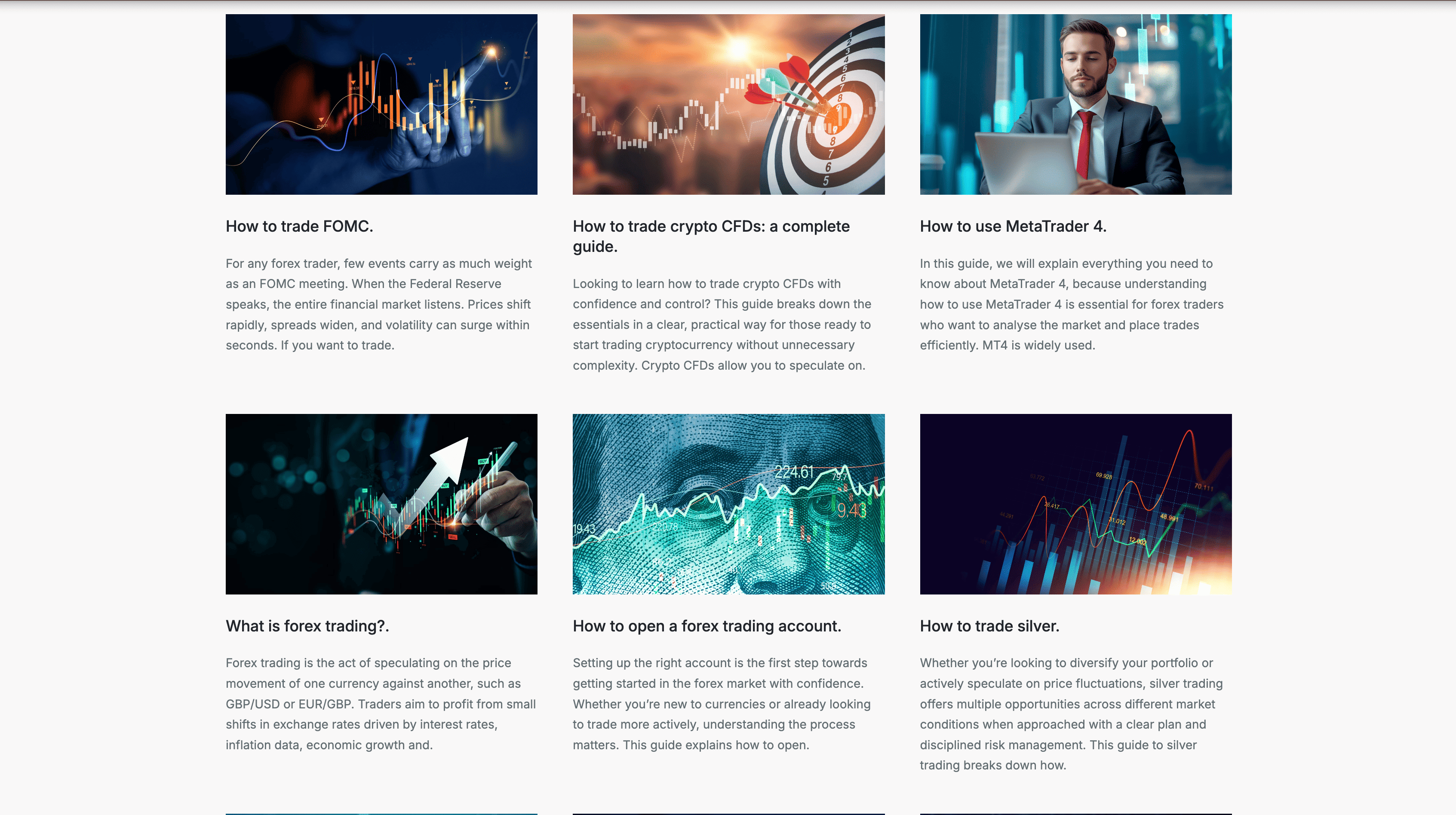
FxPro offers further content through its Academy section, with guides covering topics like leverage, MetaTrader, and gold trading. I liked that the material focuses on real-world examples rather than just theoretical explanations.
The Bottom Line
FxPro has an impressive 25 years of experience. Two of its entities have top-tier regulation from FCA and CySEC. But oversight at the offshore subsidiaries is relatively lax.
FxPro stood out with its range of platforms, combining the proprietary FxPro WebTrader platform and mobile app with MT4, MT5, cTrader, and TradingView. Additional tools like Trading Central (available on funded accounts) compliment the offering.
My live tests showed that Standard account spreads are on the wider side. But the Raw+ and Elite accounts do better for cost-sensitive traders. FxPro clients have access to a better-than-average range of instruments, including over 1,800 CFDs on equities.
FxPro’s educational offer was another bright spot. Materials are more detailed and structured than the basic tutorials provided by most competitors. If you are an active trader who values platform choice, trading tools, and broad market coverage, FxPro is worth a look.
What I Did Not Test
Please note that for this review of FxPro, I did not:
- Use a live account in my testing.
- Upload ID and proof of address to complete the sign-up process.
- Deposit or withdraw real funds.
Where to Go Next
Find the best broker for your needs. Pick a guide:
All the Brokers We Tested
We tested and scored 73 brokers in 2026. Check out our reviews.





































































See FxPro Full Information
Headquarters Country | United Kingdom |
Foundation Year | 1999 |
Regulations | FCA (United Kingdom), FSA (Seychelles), SCB (Bahamas), CySEC (Cyprus) |
Publicly Traded | No |
Number Of Employees | 500 |
Trading Desk Type | No dealing desk |
Trading Platforms | MT5, cTrader, MT4, FxPro Trading Platform, FxPro Mobile App, TradingView |
Restricted Countries | Canada, Iran, United States, Afghanistan, Yemen, Aland Islands, Democratic Republic of the Congo, Guam, Syria, Zimbabwe, Cote dIvoire, Guyana, Puerto Rico, American Samoa, Sint Maarten, Curacao, Myanmar, Somalia, Equatorial Guinea, Bonaire, South Sudan, Vanuatu, North Korea, Northern Mariana Islands, Virgin Islands, U.S., Kosovo, Sudan, Algeria, Trinidad and Tobago, Tunisia, Cuba, Spain, Azerbaijan, Liberia, Belgium, Israel, Libya, Ethiopia, Bosnia and Herzegovina, France, South Korea |
Supported Languages | Turkish, English, Russian, French, Portuguese, Thai, Arabic, Spanish, Japanese, Vietnamese, Bahasa, German, Korean, Chinese, Indonesian, Polish, Italian, Romanian, Hungarian |
Min Deposit | $0 |
Max Leverage | 1:30 (FCA), 1:10000 (FSA), 1:200 (SCB), 1:30 (CySEC) |
Deposit Options | Cryptocurrencies, PayPal, Wire Transfer, Skrill, Credit Card, Debit Card, SticPay, Google Pay, Local Banks |
Withdrawal Options | Wire Transfer, PayPal, Credit Card, Debit Card, Cryptocurrencies, SticPay, Google Pay, Local Banks |
Time to Withdrawal | 1 |
Time to Open an Account | 8 |
Crypto | Ethereum, Monero, Dogecoin, Bitcoin, Litecoin, Bitcoin Cash, Ripple, Dash, NEO, TRON, Cardano, Stellar, EOS, IOTA, VeChain, Basic Attention Token, Polkadot, Chainlink, Tezos, Uniswap, Polygon, Avalanche, Ethereum Classic, Filecoin, Solana, Zcash |
Products | Currencies, Stocks, Crypto, Indices, Commodities |
Demo Account | Yes |
OCO Orders | No |
Offers Hedging | Yes |
Automated Trading | Yes |
API Trading | Yes |
Guaranteed Stop Loss | No |
Guaranteed Limit Orders | No |
Guaranteed Fills / Liquidity | Yes |
Economic calendar | Yes |
Trading From Chart | Yes |
One-Click Trading | Yes |
Expert Advisor | Yes |
Social Trading | Yes |
Autochartist | No |
Trading Signals | Yes |
Platform Languages | Italian, Portuguese, Chinese, Arabic, Czech, Turkish, Korean, Vietnamese, English, French, Norwegian, Spanish, Russian, German, Bahasa, Japanese, Greek |
24 Hours Support | Yes |
Support During Weekends | No |
Live Chat | Yes |
Daily Market Commentary | Yes |
News (Top-Tier Sources) | Yes |
Webinars | Yes |
Deposit Fee | No |
Withdrawal Fee | No |
Inactivity Fee | Yes |
Update history
About the Authors
Dan Blystone began his career in the trading industry in 1998 on the floor of the Chicago Mercantile Exchange. Later, Dan gained insight into the forex industry during his time as a Series 3 licensed futures and forex broker. He also traded at a couple of different prop trading firms in Chicago. Dan is well-equipped to recommend the best forex brokers due to his extensive experience and understanding of the brokerage industry.
As a Senior Content Editor at FXEmpire, Ola has revised and fact-checked over 200 broker reviews and guides. Her profound understanding of financial markets has been crucial in developing the proprietary rating system.
Aviva is a Senior Content Editor at FXEmpire. Her substantial contributions include refining over 150 broker reviews and 'Best Brokers Guides,' enhancing our proprietary methodology, and ensuring every fact is meticulously verified.